


Cloud Pak What Works Well Together:
Diary Study
General Background
As Cloud Paks continue to function together as one platform, one of the most beneficial piece to the software tools is the ability to work well together for the customers. The Cross Pak team assembled together to explore the means of software tools to work well together with potential users of the new Cloud Paks.
In addition, the team is interested in how software and enterprise systems fit Cloud Paks into the work flow for potential users. This broadens the research to a focus of what “works well together” and “works well with me.”
The intended outcome is to use these findings to ameliorate the user experience to better enable software tools that actually work well together for the user.
Research Objectives
We wanted to explore different cloud software tools to achieve a goal or complete a project.
Main focus:
See when tools work well together
Observe what pain points exist when they don’t work well together
Find out when tools fit well within user's daily workflow
Investigate what problems or issues arise when they don’t
Methodology
What?
Week 1 - Diary Study: Consist of an asynchronous day-in-the-life entries of their work day, including meetings, use of cloud software, work achieved that are posted daily via the Revelation (FocusVision Revelation is an online qualitative research platform) online platform.
End of Week 1 - Homework assignment: Participants were asked to prepare stories of 2 productive and 2 unproductive moments or situations using multiple cloud tools to achieve a goal for our interview.
Week 2 - Interviews: Remote, 1 hour sessions where participants shared stories and more detailed examples of joys and pain points using multiple tools.
When?
Research fielded: September 28 - October 9, 2020

Screening for the following participants:
non-IBM customers
Must have experience with container technology (e.g. Kubernetes or OpenShift)
Experience using multiple cloud software tools to achieve a goal or outcome
Mix of larger and smaller company sizes
Some have experience with enterprise systems
Mix of people with experience using competitive cloud services (e.g. AWS, Azure, Google)
Findings
Summary
Participants linked "software working well together" with people and their work processes. These areas were strongly associated to each other, making it difficult for them to isolate how software tools work on their own.
For things to work well together, it implies more than just software. It means all the parts are working:
Works well with other software
Works well on its own
Works well with people
Works well within the workflow
Software Does Not Work Well When People Don’t Know How to Use It
Of course, that’s common sense. But what we found from users when showing them concepts and videos of IBM Cloud Paks were:
Initial Training is Weak or Non-Existent
Many have experienced training from Cloud providers that involves limited relevancy to their company needs, making training less effective. Others have been frustrated that their own company does not adequately support training.
People are Slow to Adopt to New Software & Companies Move Too Quickly
Companies struggle convincing their teams to use new software tools as many people become resistant to learning. On-boarding has become frustrating and executives or top management have to force full adoption across multiple teams. Other times, companies tend to move forward with the newest or latest technology without fully understanding how to use it.
“I feel like we are moving too fast. This is the latest, greatest thing, let's try it out. And they sort of understand it but then they don't and they push everyone to use it. I think I feel like people don't gain enough knowledge behind something that they're trying to push on to other people and their trying to always stay up to date with the latest technology.” - Engineer
Cloud Companies Over-Simplify Adoption & Create Difficult On-Boarding
Many participants believed that cloud companies intentionally promote complexity into their products, in addition to the on-boarding process, so charges can be made towards setting and managing the systems. Also, demos tend to be useless or vague.
Cloud Companies Forget About the Daily User
Numerous participants felt that once a deal is reached, they are forgotten or ghosted by cloud companies for on-going training and updates on those products. Some felt that cloud companies don’t work closely enough with actual users to develop the products and it shows.
“The software companies after they struck a deal with the organization, they kind of put us on the side a little bit in terms of keeping us updated with the new releases and new developments.” - Business Analysts
Other Perspectives
Participant’s Views
Participants confessed that staying on task and project completion is a moving target for them. Because of too many cooks in the kitchen, it's harder to focus and maintain work. The tools themselves make work harder with issues, such an increase in alerts, notifications, dashboards and multiple windows opened across software tools.
During the diary study, participants tracked their work for 4 consecutive days.
On average, each participant lost track of what they were doing at least twice each day.
Each participant had at least 3 meetings per day.
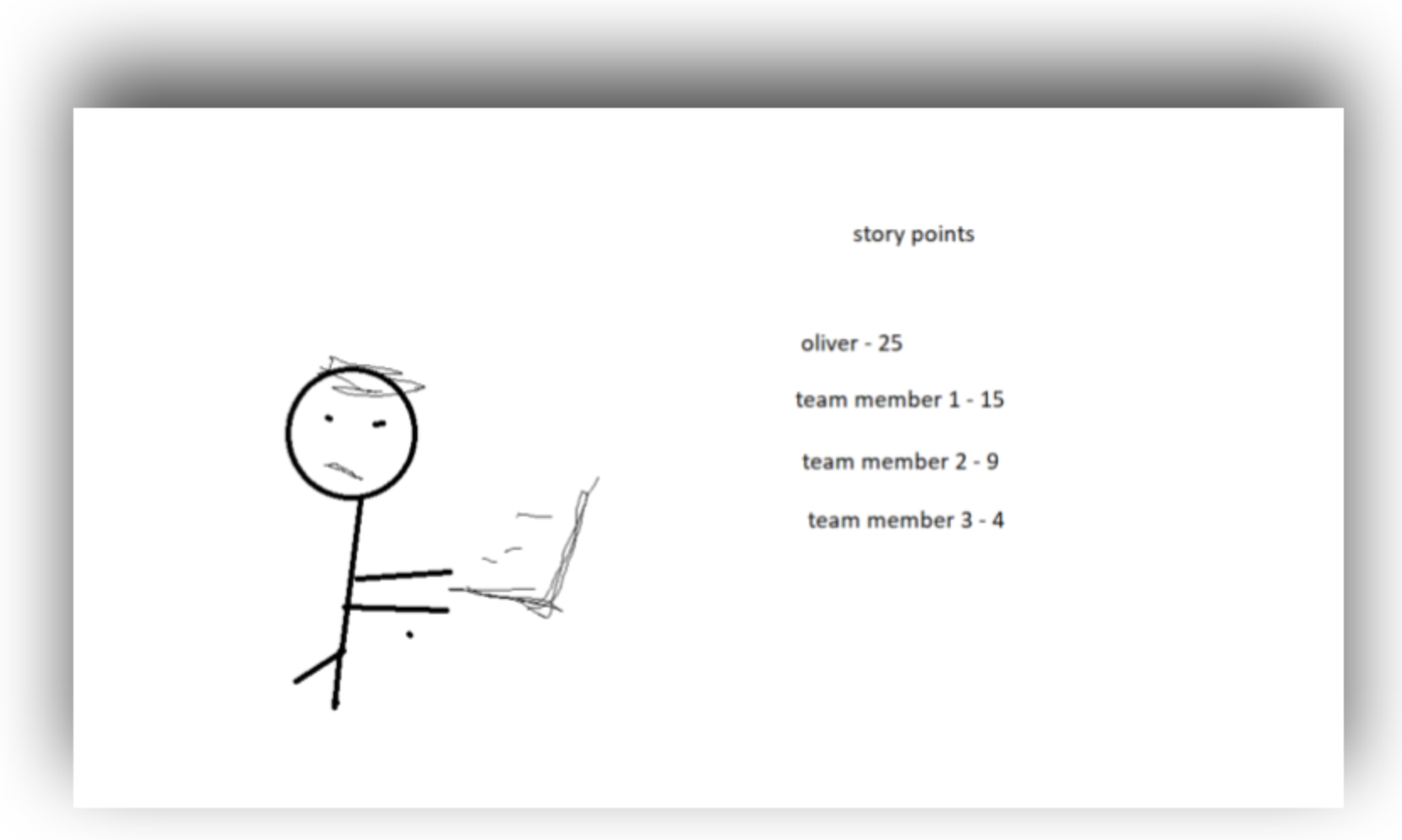
On a weekly basis, participants had to check across 6 different dashboards. The highest number for a single individual was 25.
Blockers that participants came up with:
too many meetings
troubleshooting tickets took up more time than expected
QA problems with features
asked to help out on another team’s feature
learning new material slowed down progress (e.g. using docs to figure out a configuration set up)
unable to find the contact person for a specific project or the ticket owner on another team to get questions answered
team members too busy to help
communication problems with other teams causing too much back and forth and no decision -making
team not on the same page about a project
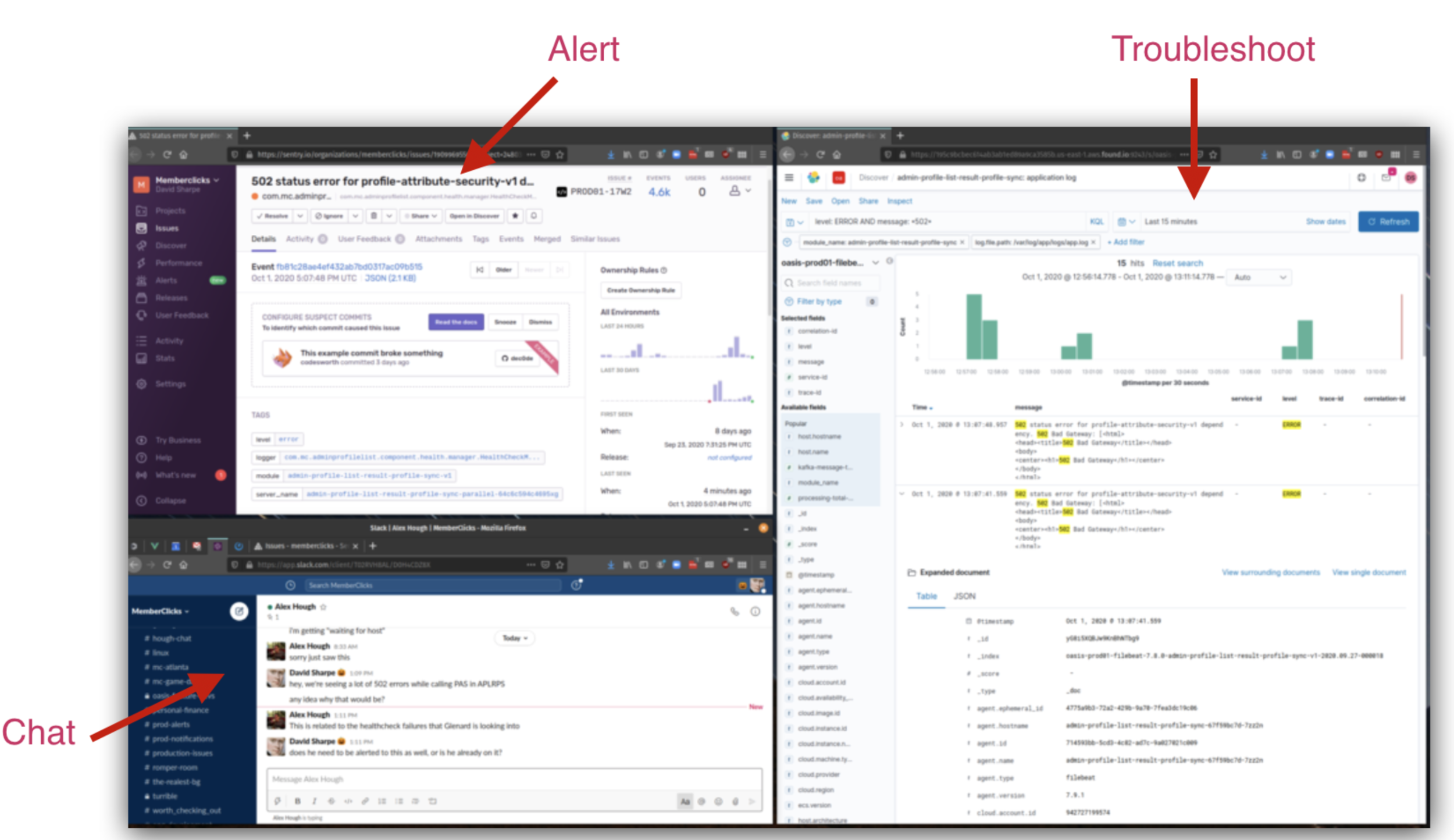
Alerts Require Working with Multiple Tools
Multiple tools may focus on alerts (some kind of quick, unusual notification for any anomalies or dysfunctions). Multiple participants use multiple tools to handle alerts because the cloud platform itself did not provide all the functionality needed.
Picture on left: Dairy entry of an image shared by an engineering research participant to illustrate multiple tools used in working with alerts.
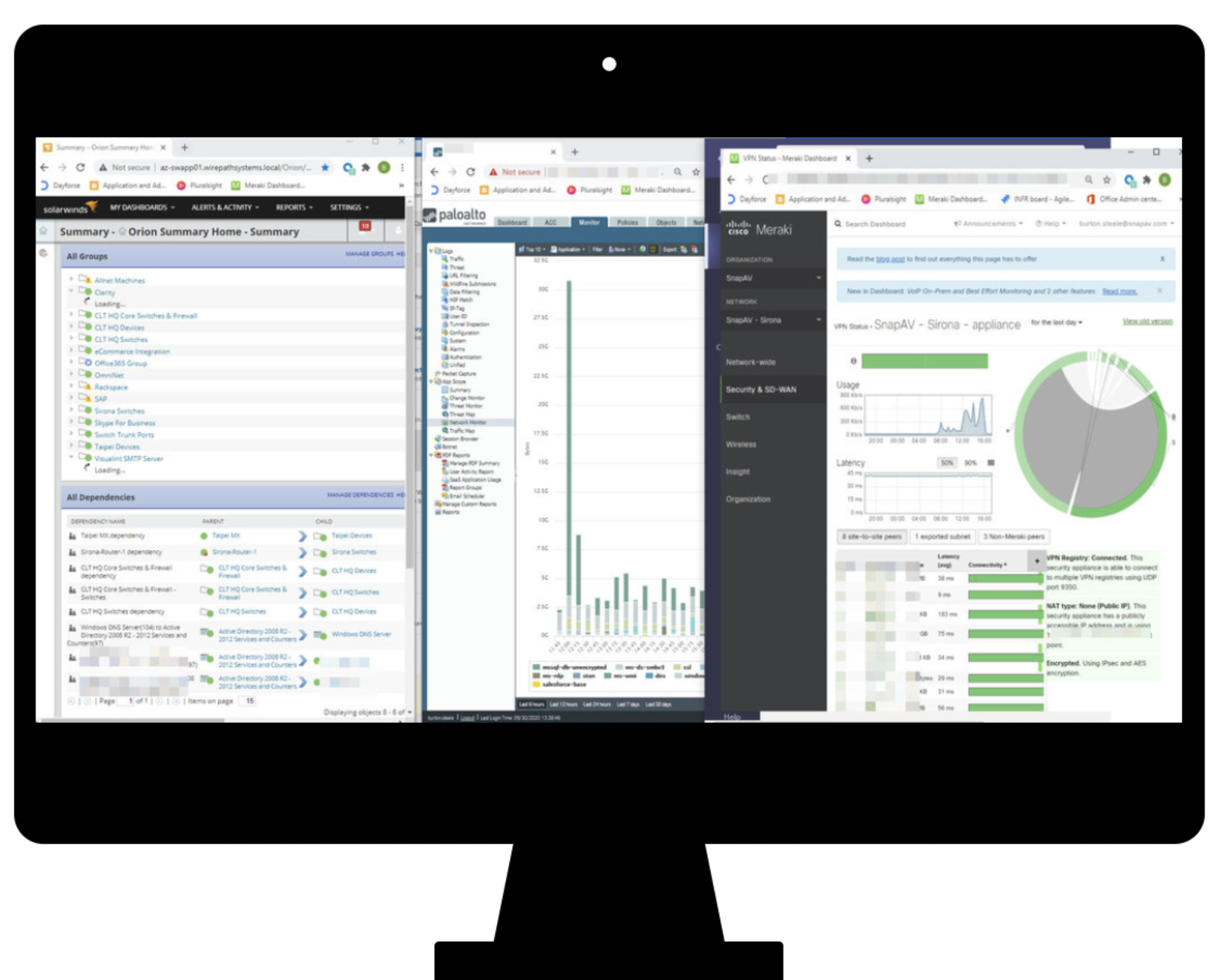
Multiple Dashboards Viewed at Once
Participants wanted a single and clean, initial dashboard view that is easy to interpret, manipulate, and understand. This meant less clutter, logical order, quickly seeing problems via colors, descriptive section titles and easy, intuitive switching between products or projects.
Picture on right: Dairy entry of an image shared by an admin research participant to illustrate that multiple screens are always in use. His dashboard is on the far right.

Participants Mentioned Having Fewer Cloud Tools
Various tools comes with lots of learning curves. They don’t necessarily work the same way and don’t always allow a view of a single dashboard.
"I’d like a super comprehensive tool that has capacity to span across a larger functioning area. So right now, as I probably named, there’s like 10 different software tools I use. If I could it in one tool, that would be amazing. I only need to learn and master one software, and so does my team, we don't all need to know, five or 10 different software tools. There's one standardized training for the entire institution. Everyone uses that one software, and because it is one software, there's less likelihood, it will be for there to be any data recognition errors or file read errors and things of that nature because it's all going to be the same." - Admin
Considerations
Recommendations for the Design/Engineer Team
Help recover sessions
Ensure that time outs and switching screens don’t cause work to be completely lost as it is likely that users will be lost as they switch to different tools or other tasks. Also, have a reminder for users on what steps they have completed so they can remember where they left off.
Avoid useless alerts across multiple tools
Consider how to aggregate and/or control alerting so that it doesn’t clutter chat spaces and in boxes with false positives and duplication.
Offer clickable alerts for a quick troubleshooting
Alerts should get users right to the problem. Consider how alerts can direct users to the place where they can get the most done in understanding the problem quickly. Users want a direct link to a useful view, not simply landing on a dashboard. Connecting alerts to logs was high on the wish list.
Offer clean and clear dashboards
Always assume that dashboards will be viewed in the company from other screens and tools. Users need to orient themselves quickly and refer back easily e.g. important things need to jump out, the order should be logical and good descriptions are crucial.
Make Searching and Querying Logs Consistent and Simple
Logs continue to be a huge pain point which means no one company has nailed it. Simple searching that doesn’t require a lot of inputs and a consistent way to query across tools are two ways to ease a very laborious experience.
If possible, the less, the better
Cloud software tools are proliferating and users are struggling to learn them all and keep track of them. Whenever is is possible to have fewer tools with more functionality, users would rather learn one thing, know how it works and move on to getting work done.
Integrate Paks with other communications tools to help teammates
By integrating with Slack, Microsoft Teams, Jira, and other platforms, we can help ensure that alerts, notifications, updates and any other communication is received and used by entire teams.
Offer training inside the software tools
For on-boarding, consider adding tool tips and guidance that can be turned off and on at any given time to accommodate employee turn-over
Offer hover states or tool tips for definitions of terminology for new or current users working across tools and platforms.
Other Things I’ve Learned
For Success Among the Team Using Cloud Software, There Needs a Clear Alignment
Teams must rely heavily on communication and collaboration when using software, such as Jira, Github, and Microsoft Teams. These tools are considered an essential part of the overall cloud toolkit that ensure these teams that everything works well together.
The biggest benefit they provide is alignment across teams which ensures that everyone agrees on what to work on. Without that, work that is done within cloud software tools are missed and ignored.
Generalists are Used By Companies to Create Transparency
Participants understood that significant rise of software generalists within their companies. Having employees who understand cloud software and it's processes helps enable people to understand each other’s work. It also ameliorates that ability of someone picking up the work with their knowledge if someone leaves the company.
Transparency Would Help Cloud Tools Be More Useful
Allow someone to document what’s been done for others inside these tool experiences for better visibility.
Obtain alerts when anyone is touching or changing something within the tools
“There's nothing that will directly alert us. The tools that allow people to literally work on code at the same time. But it would be nice if I could almost get a notification feed that said 'Hey, Jared is touching these files right now.’ Just to head stuff off so I don’t do the same work or end up losing work because he’s changed things.” - Engineer